
The parts, in their makers' own words
A home hub of this kind is a small computer in the house that knows every connected device. One open hub of this kind is Home Assistant, which describes itself as open source home automation that puts local control and privacy first 1. Its installation guide lists a Raspberry Pi 5 or a Raspberry Pi 4 among its suggested hardware 2. Raspberry Pi's documentation describes a Raspberry Pi device as a compact computer 3.
At the far ends are the things that switch a relay or read a sensor. Many home-built ones use a microcontroller board. Arduino describes its platform as open-source electronics based on easy-to-use hardware and software, with boards that read inputs and turn them into outputs 4.
Between the hub and those ends, one common carrier is MQTT. Its own site describes it as an OASIS standard messaging protocol for the Internet of Things, built as a lightweight publish and subscribe transport, with clients small enough to be used on small microcontrollers 5.
None of these projects has seen this design, and we have built nothing with any of them. They are named so that a builder knows which kind of hub, board and protocol we mean.
What such a hub already does with a spoken request
The design starts from how the hub is already put together, so we describe that first, from its documentation.
Home Assistant's developer documentation describes its voice path in parts: one part turns the person's speech into text, has it processed and turns the reply back into speech; a conversation part processes the text, and its built-in agent does that by matching the text to an intent; another part carries the intent out 6. The same page says that other software can provide the conversation agent, and the speech-to-text part as well 6. Text can also be handed to the hub directly, already transcribed 7.
Two more facts matter for a design. First, the hub decides which devices voice may touch at all: its documentation says devices must be exposed to its assistant before a voice command can control them, so that sensitive ones such as locks and garage doors are not controlled by voice by accident 8. Second, what the hub does to a device is an action with a target, such as turning on a light 9.
The hub already has the two things a command model needs: a closed list of what may be done, and a place where a sentence is turned into one item of that list.
The design, step by step
Six steps. Each says what would happen, and which part would do it. None of it is built.
1 · A person says what they want
“Turn on the porch light.” Spoken to a microphone in the room, or typed into the hub's own app.
2 · A speech recogniser turns speech into text
The model works on text. Turning a voice into text is a separate component, and the hub's documentation treats it as its own replaceable part 6. Which recogniser to use is a choice for the builder.
3 · The model, on the hub computer
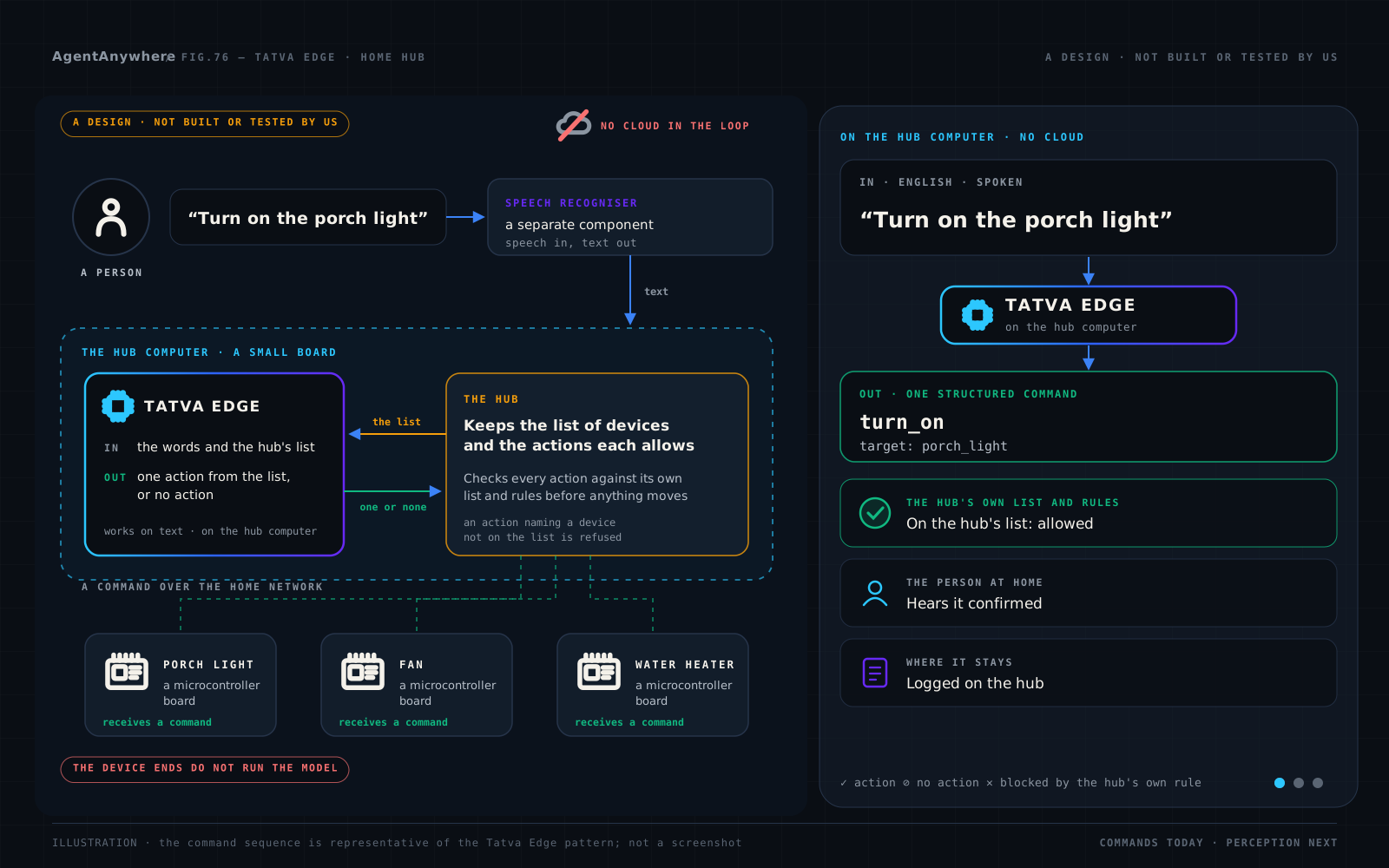
Tatva Edge would run on the same small computer as the hub. It would receive two things: the text, and the hub's list of exposed devices with the actions each one allows. It would return one structured action, with its target and values named, or no action.
4 · The hub checks it
The hub would check the action against its own list and its own rules before anything moves, as it does for a request from any other source. A device that is not exposed to voice would not be on the list the model receives 8, so in this design the model is never given it, and the hub would refuse an action that named it.
5 · The device end receives a command
The hub would carry out the action. For a device built on a microcontroller board, that can be a message over MQTT, which the hub's documentation covers 10; Arduino publishes a library for sending and receiving such messages on its boards 11. The board does not run the model. It receives a command.
6 · The home hears what happened
The device reports its new state to the hub, and the hub tells the person, in text or through its own text-to-speech part 6. A refusal is reported the same way.
Two ways it can be connected
The hub's documentation leaves two doors open, and this design can use either.
As the hub's conversation agent. The developer documentation says other software can provide the conversation agent 6, and describes what one receives: the person's text and its language 12. In this route the model would be connected through that interface, and the hub would hand it the text and call back with the result.
Beside the hub. A small program on the same computer would take the text, ask the model for one action or none, and hand an action to the hub through the hub's own interface, where the hub's usual checks apply.
We have written neither. Which route is better depends on things we have not measured, and we will say so again when there is something to show.
Three requests, three outcomes
Illustrative, as in the figure. The device and action names are examples, not any hub's real names.
| The request | What the model would return | What the hub would do | What reaches the device end |
|---|---|---|---|
| The request: “Turn on the porch light.” | One action: turn_on, with target: porch_light. | The porch light is on its list and the action is allowed. It carries the action out. | The microcontroller board behind the porch light receives a command and switches its relay. |
| The request: “Set the water heater to 90 degrees.” | One action: set_temperature, with target: water_heater and celsius: 90. | The value is above the limit the hub holds for that device. The hub refuses it and says why. | Nothing. The board's own thermostat and cut-out were never asked. |
| The request: “Unlock the front door.” | No action. The lock is not exposed to voice, so it is not on the list the model received. | Nothing to check. | Nothing. The lock keeps its own key and keypad. |
The second row is the hub's rule at work and the third is the hub's list at work. In neither case is the model the safeguard.
The small board at the far end
This is the part most often blurred, so here it is in two columns.
On the hub computer
The hub, with its list of devices and allowed actions.
The speech recogniser, if speech is used.
The model, which receives text and the list and returns one action or none.
On the microcontroller board
A program that receives a command and acts on it: switch a relay, set a fan speed, report a reading.
Its own protections, such as a thermostat or a cut-out, which no command from the hub overrides.
No model. A microcontroller board does not run Tatva Edge in this design.
See it on your own scenario
Bring your hub's list of devices and actions, and the rules you want it to keep. Book a live demo and we will show the pattern on your command list, your language and your rules.
What this is not
It is not built. We have not connected Tatva Edge to Home Assistant or to any other hub. We have not run it beside a home hub, and we publish no speed, size or memory figure for it on a Raspberry Pi. We have sent no command from it to an Arduino board or to any other microcontroller board. Nothing in this post has been tested by us.
It is not endorsed by anyone named here. Home Assistant, Raspberry Pi, Arduino and MQTT are independent projects and products. ShepHertz is not affiliated with, sponsored by or endorsed by any of them. Their names appear here only to say which kind of hub, board and protocol this design is about. Raspberry Pi is a trademark of Raspberry Pi Ltd. Arduino® is a trademark of Arduino S.r.l. The other names belong to their respective owners.
It is not a safety function. The model is never placed in a safety path or a control loop. The hub's list and rules, and each device's own protections, stay where they are.
It is not a replacement for the hub. The hub keeps its devices, its automations and its own built-in assistant 13. This design changes one part: what turns a sentence into one action.
It is not an assistant. Tatva Edge is not a chat model and will not hold a conversation. A question about the weather returns no action.
It comes with no numbers. We publish no accuracy, speed, size or memory figure for it here.
Samples: planned, not written
We plan to write samples for a hub on a small board, so that a builder can try this design and tell us where it is wrong. None is written yet, and we give no date.
More in this series
Tatva at the edge — the family, the pattern and the eight settings.
Satellites — plain-language commanding for mission operations.
Launch operations — a launch-control console that answers, and a flight computer it never touches.
Drones — missions that survive a lost link.
Robotics and industry — task-level commands on the floor, in the operator's language.
Humanoids — task-level instructions for humanoids, with balance and motion left to the robot.
Vehicles — an in-cabin assistant that works in the tunnel.
Wearables — private voice on the wrist and the ear.
Home appliances — one command from the appliance's own list, with every safety rule left to its firmware.
Defence — air-gapped, observe-and-assist, a human in command.
Frequently asked questions
Can Tatva Edge be connected to Home Assistant?
This post describes a design for it, and we have not built it. Home Assistant's developer documentation says other software can provide the hub's conversation agent, and that is one of two routes the design describes. Home Assistant is an independent project; ShepHertz is not affiliated with it.
Does the model run on an Arduino board?
No. In this design the model runs on the hub computer. A microcontroller board at the device end receives a command and acts on it; it does not run the model.
Is there a published figure for Tatva Edge on a Raspberry Pi?
No. We have not run it beside a home hub, and we publish no speed, size or memory figure for it on a Raspberry Pi.
What would the model receive from the hub, and what would it return?
It would receive the person's words as text and the hub's list of exposed devices with the actions each one allows. It would return one structured action from that list, with its target and values named, or no action. The hub would check the action against its own list and rules before anything moves.
Does this design need the internet?
No. The hub, the speech recogniser and the model would all be on the hub computer in the home, and commands would travel over the home's own network.
Are there samples I can run?
Not yet. Samples for a hub on a small board are planned and not written, and we give no date.
Sources
Each project's own documentation, read on 13 October 2026. The descriptions above are ours, in our words; the pages are theirs.
- 1Home Assistant: home page.
- 2Home Assistant: Installation, Raspberry Pi.
- 3Raspberry Pi Documentation: Getting started.
- 4Arduino Docs: What is Arduino?
- 5MQTT.org.
- 6Home Assistant Developer Docs: Voice in Home Assistant.
- 7Home Assistant: Conversation.
- 8Home Assistant: Exposing entities to Assist.
- 9Home Assistant: Performing actions.
- 10Home Assistant: MQTT.
- 11Arduino Docs: ArduinoMqttClient, marked beta on that page.
- 12Home Assistant Developer Docs: Conversation entity.
- 13Home Assistant: Assist.
Written by
AgentAnywhere Research
The team that builds the platform and the models
AgentAnywhere Research writes about the platform, the model families and the trust layer we build and run in India. Where a figure is ours, it says what it covers; where something is a demonstration, it says so.