
Can a LangChain agent run under your controls without rewriting it?
A team has an agent written in LangChain. Before it touches customer data, the platform team wants it on the inventory, approved by a named reviewer, run as one step of a governed flow, with its tools reached through one gateway and its model calls screened and masked. The question is whether that means rewriting the agent.
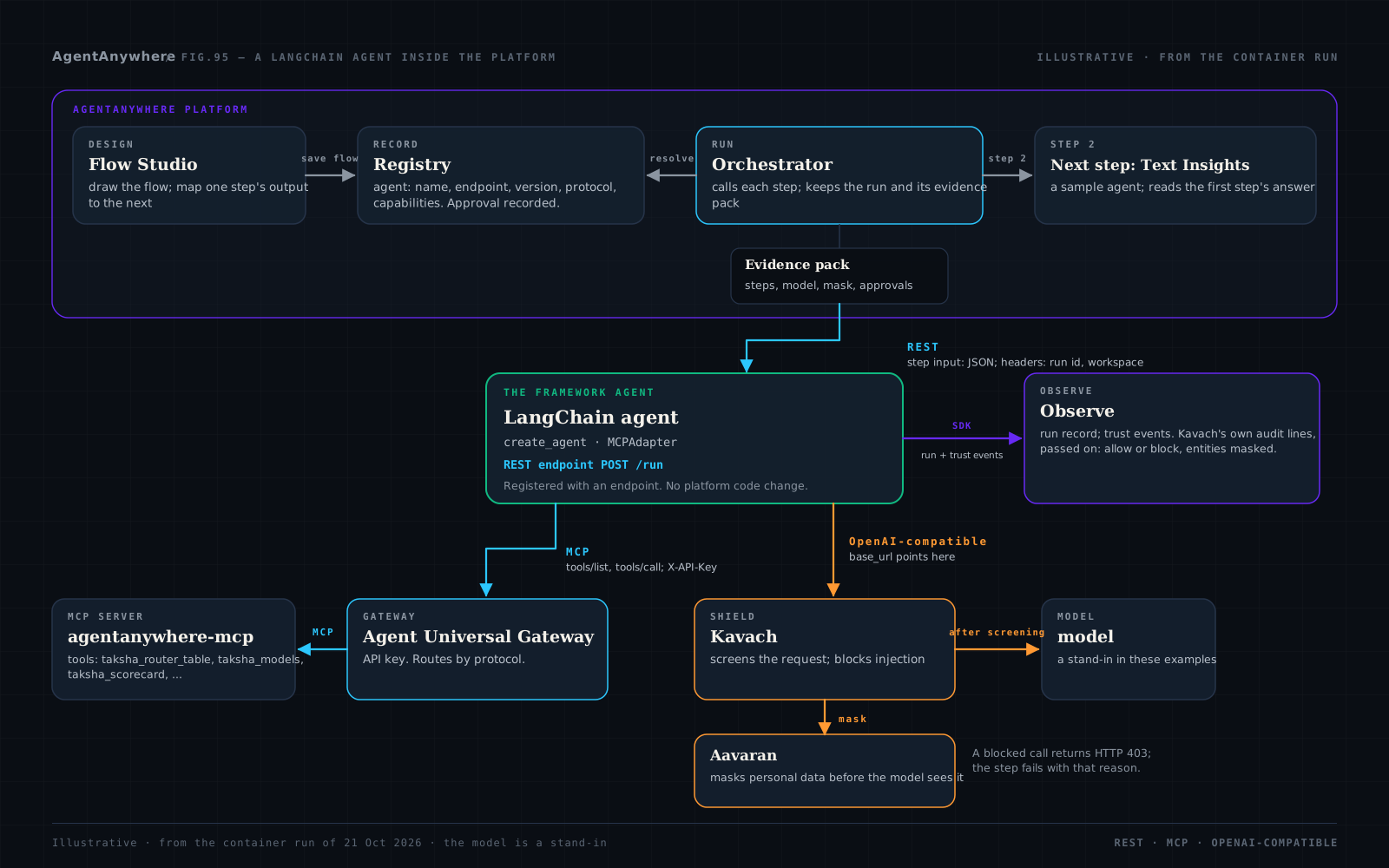
It does not. The platform's controls apply to an endpoint, not to a framework. The Registry and the Orchestrator work on a contract: an endpoint that speaks REST, A2A or MCP, JSON in and JSON out. Flow Studio has no framework chooser.
The rest of this post is the LangChain example from the container run, step by step, with its code. The overview of the series puts the five frameworks side by side.
1. Register the agent by its endpoint
The agent is registered in the Registry with a manifest: name, description, endpoint, version, protocol and capabilities, with input and output schemas. Registering it is enough for it to appear in Flow Studio's side panel. The example's manifest, with the endpoint as a placeholder:
POST /tenants/{tenant_id}/agents/register   (multipart field: manifest)
{
  "name": "LangChain example agent",
  "description": "A LangChain agent that looks up a routing table through MCP tools behind the Gateway, with its model calls going through Kavach and Aavaran.",
  "endpoint": "http://<agent-host>:8000/run",
  "version": "0.1.0",
  "protocol": "rest",
  "capabilities": [
    "mcp-tools",
    "tool-use",
    "kavach-shielded-model-calls"
  ],
  "agentType": "agent",
  "interface": "rest",
  "category": "Framework examples",
  "agent_metadata": {
    "health_endpoint": "http://<agent-host>:8000/health",
    "framework": "langchain"
  },
  "input_spec": {
    "type": "object",
    "required": [
      "task"
    ],
    "properties": {
      "task": {
        "type": "string",
        "description": "What to ask the agent"
      },
      "task_class": {
        "type": "string",
        "description": "A task class to look up, such as bug-fix"
      }
    }
  },
  "output_spec": {
    "type": "object",
    "properties": {
      "answer": {
        "type": "string"
      },
      "tool_calls": {
        "type": "array"
      },
      "model": {
        "type": "string"
      },
      "shielded_by": {
        "type": "string"
      },
      "entities_masked_count": {
        "type": "integer"
      }
    }
  }
}
The author is set to the signed-in user. Headers an agent needs are kept in the Registry's encrypted store.
2. Submit it for approval, and approve it
Approval is a request per agent version, pending, then approved or rejected, with who submitted it and who decided. In the run, the agent was submitted and approved before the flow ran.
POST /tenants/{tenant_id}/agents/{agent_id}/submit-for-approval
POST /tenants/{tenant_id}/agents/{agent_id}/approval/{approval_id}/decide?decision=approve
The Registry records the decision and emits the audit events approval_submitted and approval_approved.
3. Serve it as a step: the contract
The Orchestrator calls a REST agent with POST and a JSON object, adding X-Tenant-Id, X-Agent-Id, X-Correlation-Id (the run's id) and X-Span-Id, and expects a JSON object back; an answer of 400 or more fails the step. Before a run it probes each endpoint with HEAD, then GET, and any answer under 500 passes. The agent's host must be public, or listed in AGENT_INTERNAL_HOSTS. The example serves the agent with a few lines of FastAPI:
# common/aa_examples/step_server.py (trimmed): the whole of what the platform asks of a REST agent
app = FastAPI(title=f"{framework} example agent")

@app.get("/health")
def health():
    return {"status": "ok", "framework": framework}

@app.get("/run")
def probe():
    # The Orchestrator probes with HEAD, then GET; any answer under 500 passes.
    return JSONResponse({"detail": "POST a JSON object to this address."}, status_code=405)

@app.post("/run")
async def run(request: Request):
    payload = await request.json()
    ctx = RunContext.from_headers(request.headers)   # X-Tenant-Id, X-Agent-Id, X-Correlation-Id, X-Span-Id
    outcome = await execute(framework, run_agent, AgentRequest.from_payload(payload), ctx)
    return JSONResponse(outcome.body, status_code=outcome.status)
Drawn in Flow Studio, the LangChain agent is the first step of a two-step flow; the second, the Text Insights sample agent, reads its answer.
4. Tools over MCP, through the Agent Universal Gateway
The agent's tool calls go to the Gateway's MCP route, with a Gateway API key in X-API-Key; the Gateway checks them and passes them over MCP to the agentanywhere-mcp server. Five questions to ask of an AI agent gateway explains what the Gateway checks. The LangChain code:
# langchain/agent.py (trimmed)
from fastmcp.client import Client
from fastmcp.client.transports import StreamableHttpTransport
from langchain.agents import create_agent
from langchain.mcp import MCPAdapter

async def run_agent(req, ctx):
    s = ctx.settings
    # Tools over MCP, through the Gateway; the Gateway's API key travels in X-API-Key.
    transport = StreamableHttpTransport(s.mcp_url, headers=s.gateway_headers())
    async with MCPAdapter(Client(transport)) as adapter:
        tools = await adapter.list_tools()
        agent = create_agent(build_model(ctx), tools, system_prompt=INSTRUCTIONS)
        state = await agent.ainvoke({"messages": [{"role": "user", "content": req.prompt()}]})
`langchain.mcp.MCPAdapter` is the library's MCP client (marked beta by LangChain); the header goes on fastmcp's `StreamableHttpTransport`. In the run the agent called the taksha_router_table tool through the Gateway.
5. Model calls behind Kavach and Aavaran
The agent's model client points its base URL at Kavach, which is OpenAI chat-completions compatible. Kavach screens the request for injection, has Aavaran mask personal data, calls the model, checks the answer and keeps an audit line; tool calls pass through. In the run, Kavach's audit lines recorded 4 entities masked, and neither the e-mail address nor the PAN in the request reached the model server. Masking before the model is one of the safeguards the DPDP Rules name.
# langchain/agent.py
from langchain_openai import ChatOpenAI

def build_model(ctx):
    s = ctx.settings
    # The model client points at the proxy; X-User-Id lets Kavach's audit line be tied to this run.
    return ChatOpenAI(model=s.llm_model, base_url=s.llm_base_url, api_key=s.llm_api_key,
                      default_headers=ctx.llm_headers(), temperature=0, max_retries=0)
Aavaran's own SDK has the same idea as a helper, `veil_chat_openai`: a `ChatOpenAI` pointed at Aavaran's proxy. X-User-Id carries the run's id, so the run can find Kavach's audit lines; nothing personal.
Where the settings come from
Every address and key is read from the environment, so the same image runs in any stack. These are the values the local stack used; the key is a placeholder.
# The example reads everything from the environment, so the same image runs in any stack.
LLM_BASE_URL=http://kavach:8787/v1        # Kavach; Aavaran's proxy is http://<aavaran>:8080/v1/proxy
LLM_MODEL=<model-name>
MCP_URL=http://gateway:8000/mcp           # the Gateway's MCP route
GATEWAY_API_KEY=${GATEWAY_API_KEY}        # a Gateway API key, sent as X-API-Key
AGENTOBS_BASE_URL=http://observe:8090     # Observe
6. What the run leaves: an evidence pack and an Observe trace
The Orchestrator keeps an evidence pack for every run, built only from what it recorded: each step's status and output, the agent, the model and the mask it reported, approvals. This excerpt is real output from the container run, with ids shortened:
{
  "kind": "agentanywhere.evidence-pack",
  "run": {
    "run_id": "usecase-5-ff7d6233…",
    "status": "success"
  },
  "steps": [
    {
      "agent_name": "LangChain example agent",
      "status": "success",
      "model": {
        "provider": "kavach",
        "model": "stub-model",
        "shielded_by": "Kavach",
        "kavach_record": "bb9a97e5…"
      },
      "masking": {
        "method": "irreversible",
        "policy_id": "default-shield",
        "entities_masked_count": 4
      },
      "output": {
        "framework": "langchain",
        "framework_version": "1.4.6",
        "tool_calls": [
          {
            "name": "taksha_router_table",
            "arguments": {
              "task_class": "bug-fix"
            }
          }
        ],
        "shielded_by": "Kavach",
        "entity_types": [
          "email",
          "pan"
        ],
        "entities_masked_count": 4
      }
    },
    {
      "agent_name": "Text Insights",
      "status": "success"
    }
  ],
  "audit_events": null,
  "audit_events_note": "The audit trail could not be read for this request."
}
The audit_events note is there because the audit service was not part of the run (see below).
When Kavach refuses the call
A second run sent a real injection. Kavach refused the model call, the agent answered HTTP 403, and the step failed with Kavach's reason in the evidence pack. Real output from the container run:
{
  "run": {
    "status": "error"
  },
  "steps": [
    {
      "agent_name": "LangChain example agent",
      "status": "error",
      "error": "AgentHttpError: The agent answered HTTP 403: The model call was refused by Kavach (prompt_injection). ML injection classifier fired (label=INJECTION, score=0.985); Canonical attack phrasing matched"
    }
  ]
}
The Observe trace
The example opens a run record in Observe with its SDK, under the platform's run id, and passes on what Kavach's audit lines said. Real output from the container run, ids shortened:
{
  "correlation": {
    "run_id": "usecase-5-ff7d6233…",
    "agent_slug": "example-langchain",
    "status": "completed"
  },
  "trust_summary": {
    "events": 3,
    "kavach": {
      "allow": 2,
      "block": 0,
      "flag": 0
    },
    "veil": {
      "passes": 1,
      "entities_masked": 4,
      "entity_types": [
        "email",
        "pan"
      ]
    }
  }
}
What this does not show
No real model. The model was a stand-in server. Nothing here shows what a real model does with masked text or with tool results.
No audit service. The audit service was not part of the run, so the evidence pack's audit_events field reads "The audit trail could not be read for this request."
No Agent Lab checks. The credentials, personal-data, injection, soak and health checks need Agent Lab's runner, which was not part of the run.
No A2A. The LangChain library has no A2A server or client, so this agent is a REST step only. The LangGraph post shows a graph exposed as an A2A agent.
One environment per framework. The example has its own environment and image, pinned to langchain 1.4.6, langchain-core 1.6.12, langchain-openai 1.7.2 and langchain[mcp] with fastmcp 4.1.3, on Python 3.11. The frameworks' dependencies conflict (for example, mcp 2.x, which LangChain's MCP client uses, cannot share an environment with Microsoft Agent Framework, which caps it below 2), so each runs alone.
The platform's local stack. Every service ran in a container on a rented machine, with an in-memory workflow server. It is the platform's local stack, not a production deployment.
No Semantic Kernel. Semantic Kernel has no example: Microsoft names Agent Framework its successor.
Frequently asked questions
Can a LangChain agent run inside AgentAnywhere without changing the platform?
Yes. A LangChain agent served as a REST endpoint is registered in the Registry by its endpoint, approved, and placed in a flow as a step; no platform code changes. This was shown in a container run on 21 October 2026, with a stand-in model.
How does a LangChain agent call MCP tools through the AgentAnywhere Gateway?
With LangChain's MCP adapter, `langchain.mcp.MCPAdapter`, over a fastmcp streamable-HTTP transport that carries the Gateway's API key in X-API-Key. The Gateway routes the calls over MCP to the MCP server.
How are a LangChain agent's model calls screened and masked?
`ChatOpenAI`'s base_url points at Kavach, which is OpenAI chat-completions compatible. Kavach screens the request for injection, has Aavaran mask personal data, then calls the model; tool calls pass through. A blocked call returns HTTP 403 and the step fails with that reason.
Does LangChain support A2A?
Not in the open-source library: it has no A2A server or client. LangGraph's own A2A server is part of the LangSmith Agent Server. The LangGraph example in this series exposes a graph as an A2A agent with a2a-sdk instead.
What does the platform record when a LangChain agent runs?
An evidence pack per run, with each step's status and output, the agent's name, the model and the masking Kavach reported, and approvals; and, through Observe's SDK, a run record with Kavach's allow and block verdicts and the entities masked.
Sources
Vendor documentation read on 21 October 2026; the example's code is in agentanywhere-examples, which has no public repository yet.
Written by
AgentAnywhere Research
The team that builds the platform and the models
AgentAnywhere Research writes about the platform, the model families and the trust layer we build and run in India. Where a figure is ours, it says what it covers; where something is a demonstration, it says so.