
What “bring your own model” means
Bring your own model (BYOM), sometimes called bring your own key (BYOK), means the platform that runs your AI agents does not decide which language model they use. You connect the account you already have, under the contract and the data terms you already agreed, and the platform calls the model on your behalf.
It matters for three reasons. Procurement and legal have usually approved one provider, not five. The best model for a task changes more often than a workflow should. And a regulated team needs to say, for any run, which model answered and on whose account.
The six providers
| Provider | What a workspace connects | Which model a step uses |
|---|---|---|
| Provider: AgentAnywhere models (Manthan, Taksha) | An AgentAnywhere model key | Manthan unless the step or the connection names another |
| Provider: OpenAI | An OpenAI API key | The one the step names, or the connection's default |
| Provider: Azure OpenAI | A key and the address of your Azure resource | A deployment in that resource |
| Provider: Claude (Anthropic) | An Anthropic API key | The one the step names, or the connection's default |
| Provider: Gemini (Google) | A Gemini API key | The one the step names, or the connection's default |
| Provider: Amazon Bedrock | A region, with an access key pair or a Bedrock API key | Any model or inference profile enabled in that AWS account |
Manthan and the Taksha models are built on open foundation models, measured and served by us. A deployment that serves them inside its own perimeter points the platform at that address, so the step never leaves the building.
How to connect a model
1. Open Integrations and find the provider under “Model providers”.
2. Choose Connect and enter what that provider needs. The page says what is still missing if you stop halfway.
3. Choose Add to workspace. The provider's “Ask a model” tool is now one of your agents.
4. Put the tool on the canvas in Flow Studio as a step, with a prompt. Whatever an earlier step found can be passed in as context.
5. Run the workflow. The step's output is the model's answer.
One step, one answer shape
What a step sends:
{
  "prompt": "Summarise this notice for the customer in two sentences.",
  "context": { "notice": "Service resumes on the 14th." },
  "system": "Plain words. No promises about dates.",
  "model": "optional: the model to use"
}
What comes back, from any of the six:
{
  "status": "answered",
  "answer": "…",
  "provider": "azure-openai",
  "model": "the model that answered",
  "truncated": false,
  "shielded_by": null,
  "usage": { "prompt_tokens": 212, "completion_tokens": 48, "total_tokens": 260 }
}
An example of the shape. The token counts are made up for the example.
What changes when the provider changes?
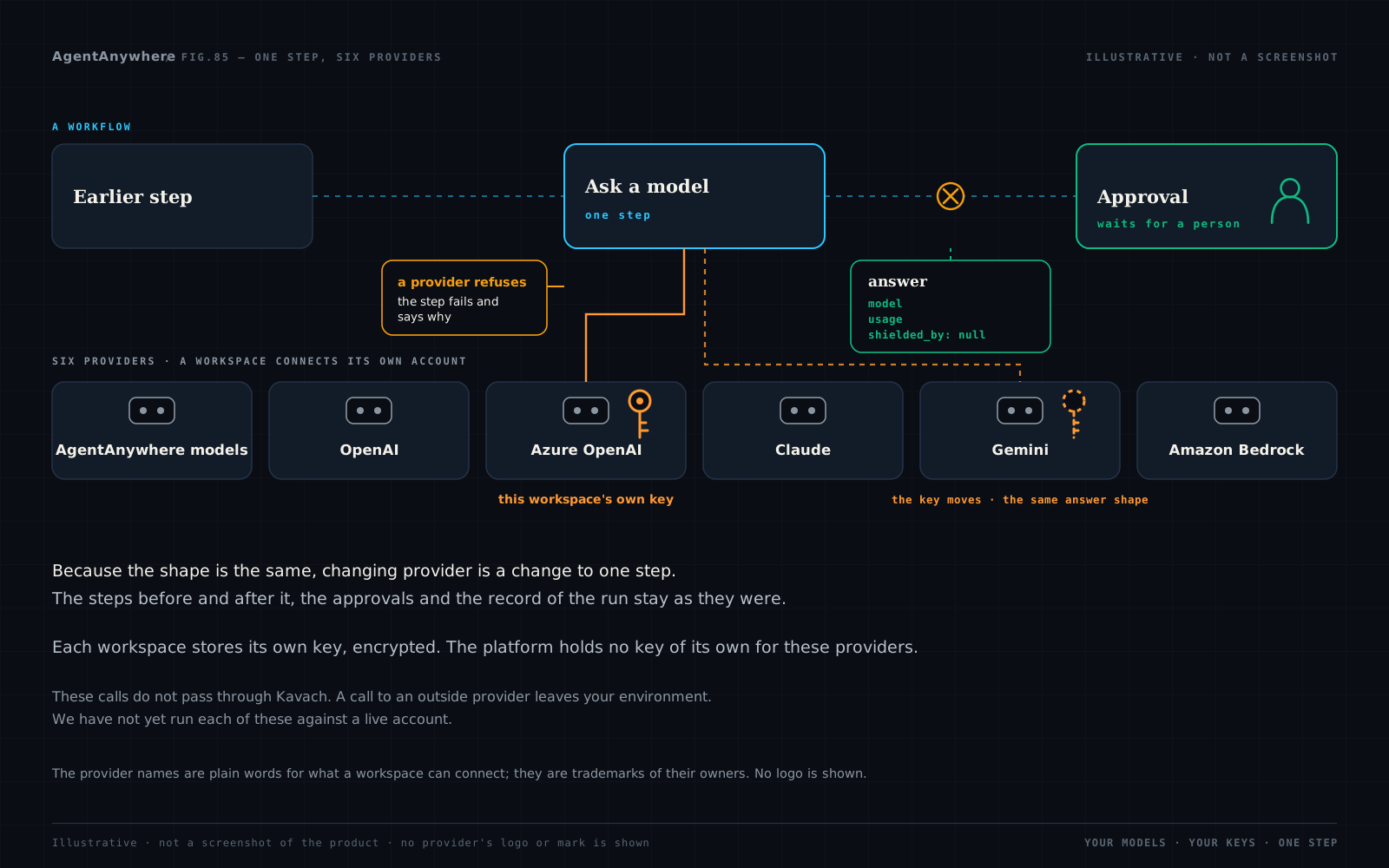
Because the shape is the same, changing provider is a change to one step. The steps before and after it, the approvals and the record of the run stay as they were.
What happens when a model says no
A refusal fails the step
If the provider declines the request or its content filter stops the answer, the step fails and says so in the provider's own words. Nothing is handed to the next step as if it were an answer.
A wrong key is said to be one
A rejected key or an unknown model ends the step at once with the reason. It is not tried again, because trying again would not help.
What may come right is retried
A rate limit, a provider error or a timeout is tried again by the platform.
An answer cut short says so
If the model ran out of its allowance, the output is marked `truncated`; if it wrote nothing at all, the step fails and says to raise the limit.
Where your keys live
For security teams
Encrypted, and never shown again. A connection is stored encrypted. The Integrations page lists it by the names of its fields and never returns a value.
Read at the moment of the call. Replace a key and the next run uses the new one. Delete a connection and the next run stops.
The address is not the caller's to choose. Each provider is called at its own address. The one address a workspace supplies, its Azure resource, has to be an Azure host.
For platform owners
No shared account. There is no deployment-wide key for these providers, so there is no shared bill and no cross-workspace use.
Usage on every answer. Each answer carries the token counts the provider reported.
The same governance as any step. A model step sits in the same workflow as approvals by a named person, and the run is recorded like any other.
What we don't claim
We have not yet run each of these against a live account. The connections to OpenAI, Azure OpenAI, Anthropic, Google and Amazon Bedrock are written to each provider's published interface. This post describes what the step is built to do; it does not report a run on a provider's live service.
A call to an outside provider leaves your environment. When a step asks OpenAI, Azure OpenAI, Anthropic, Google or AWS, the prompt goes to that provider under your agreement with them. If the work must stay inside your perimeter, use a model served inside it.
These calls do not pass through Kavach. Kavach, our AI security shield, stands in front of the model it is set up with; it does not carry a call to another provider's account. The card for each provider says so before you add it, and every answer carries `shielded_by: null`. When a prompt may carry personal data, put an Aavaran data masking step before the model step, or use the Kavach step instead.
Text in, text out. A model step takes a prompt and returns an answer. Streaming an answer as it is written, images and files in a prompt, and tools the model may call are not part of this step.
How it fits the platform
The model step runs in workflows designed in Flow Studio and run by the Orchestrator, beside agents you register over REST, MCP or A2A. Agents built with an agent framework are registered the same way, and Build Agent has starters for several. See the platform overview. Bring a workflow and the model you are already allowed to use.
Three posts follow one piece of work each, with the model step in it: a credit memo in a bank, one workspace per client at an outsourcer and a maintenance work order designed for a closed environment.
Names on this page
OpenAI, Azure OpenAI, Claude, Gemini and Amazon Bedrock are named here only to say which accounts a workspace can connect. The names are trademarks of their owners: OpenAI; Microsoft; Anthropic; Google; and Amazon.com, Inc. or its affiliates. Naming them describes a connection, not a partnership or an endorsement, and ShepHertz is not affiliated with, sponsored by or endorsed by any of them.
Frequently asked questions
What is bring your own model (BYOM) in an AI agent platform?
Bring your own model means the platform that runs your AI agents calls a language model on an account you supply, instead of one the platform chooses and bills. You keep your own contract, data terms and spending controls with the provider.
Which language models can a workspace connect on AgentAnywhere?
AgentAnywhere has ready-made model steps for AgentAnywhere models (Manthan and the Taksha line), OpenAI, Azure OpenAI, Claude from Anthropic, Gemini from Google and Amazon Bedrock. Any other model can be reached by registering an agent that calls it over REST, MCP or A2A.
Can I use my own OpenAI, Azure OpenAI or Amazon Bedrock account with AgentAnywhere?
Yes. Each workspace connects its own account on the Integrations page: an API key for OpenAI, a key and resource address for Azure OpenAI, and a region with an access key pair or a Bedrock API key for Amazon Bedrock.
Does AgentAnywhere store my API keys?
A workspace's key is stored encrypted and is never shown again after it is entered. The platform lists a connection by the names of its fields only, reads it at the moment of each call, and has no key of its own for these providers.
Can I switch from one model provider to another without rebuilding a workflow?
Yes. Every model step takes the same input and returns the same fields, so switching provider means changing one step. The surrounding steps, approvals and run record are unchanged.
Are calls to OpenAI, Claude, Gemini or Amazon Bedrock screened by a guardrail?
Not by default. These calls go straight to the provider on your account and do not pass through Kavach. Use an Aavaran data masking step before the model step, or the Kavach step, when a prompt may carry personal or sensitive data.
Can Manthan run inside my own environment?
Yes. Manthan can be served inside a customer's perimeter, and the platform's model step is pointed at that address by whoever runs the deployment, so the call does not leave it.
Have these connections been run against the providers' live services?
Not yet. The connections are written to each provider's published interface, and we have not yet run each of them against a live account. This post describes what the step is built to do.
Written by
AgentAnywhere Research
The team that builds the platform and the models
AgentAnywhere Research writes about the platform, the model families and the trust layer we build and run in India. Where a figure is ours, it says what it covers; where something is a demonstration, it says so.