
What does observability mean for AI agents?
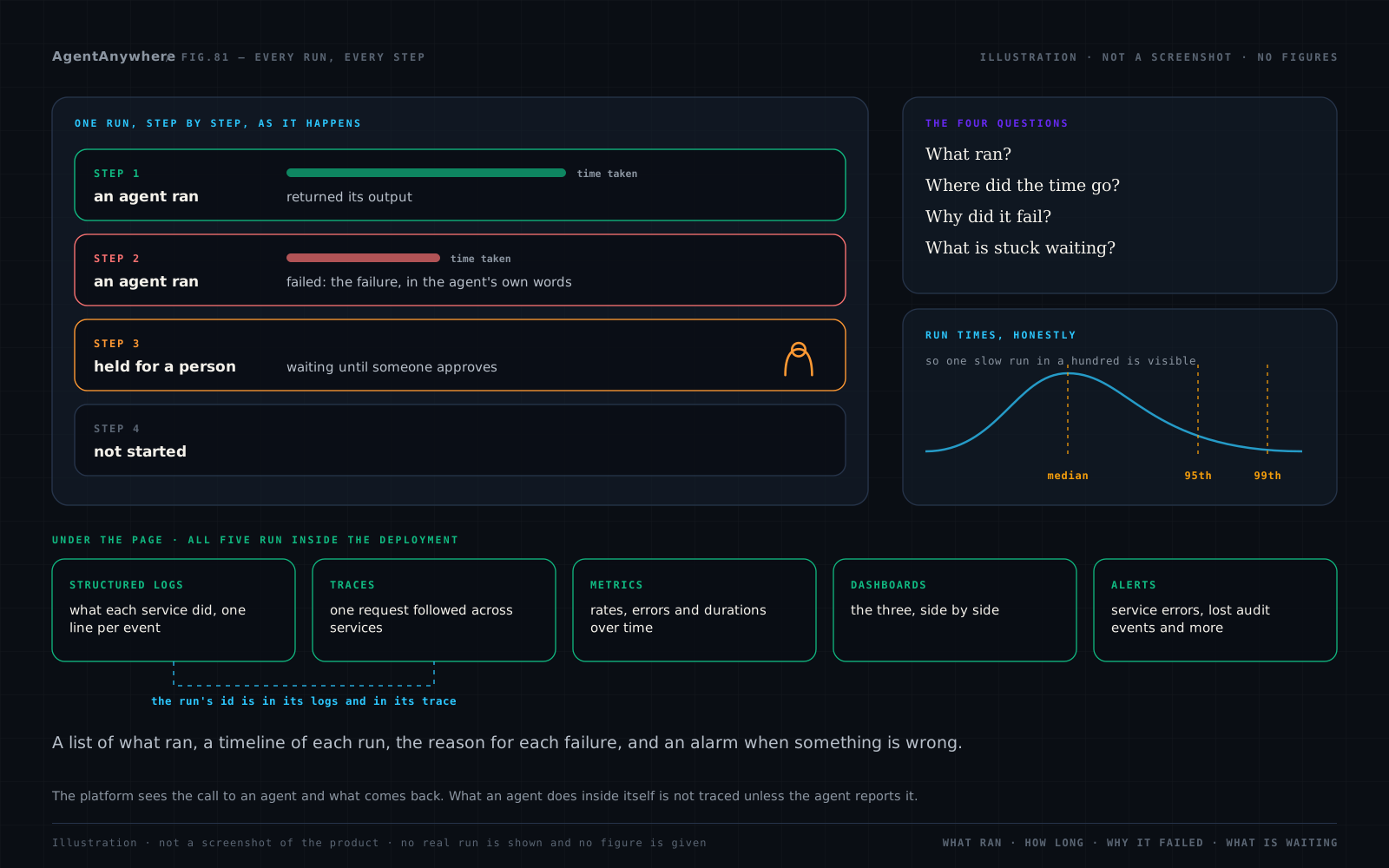
Observability is being able to answer, from the outside, what a system did and why. For a workflow of AI agents that means four questions: what ran, where the time went, why it failed, and what is stuck waiting. Model quality is a separate question; observability is about the work around the model.
What can you see?
Every run, live
A list of runs, and for each one a timeline of steps that updates while the run is going.
Each step's outcome
The agent, the time taken, the output, or the failure in the agent's own words.
Latency that tells the truth
Median, 95th and 99th percentile run times, so one slow run in a hundred is visible.
Agents by health
For each agent: how often it is called, how often it fails and its most recent errors.
What is waiting for a person
Steps held for approval and questions an agent has asked are listed until someone decides.
Run again, or stop
A run can be run again from its record, or cancelled while it is going.
What is under the page?
| Signal | What it is for |
|---|---|
| Signal: Structured logs | What each service did, one line per event, carrying the run and request ids |
| Signal: Traces | One request followed across services |
| Signal: Metrics | Rates, errors and durations over time |
| Signal: Dashboards | The three above, side by side |
| Signal: Alerts | Service errors, lost audit events, run history not being written, the proxy failing |
All five run as part of the deployment. A run's id appears in its logs and its trace, so a failed step on the page leads to the lines the services wrote about it.
What is kept, and what is kept out?
A run's step-by-step record is kept for 30 days unless the deployment sets another period. That is the run's own period, separate from the audit trail's.
A workspace's keys are not written into run records or the Integrations page. A run belongs to its workspace: its people see their own runs, and nobody else's.
What we don't claim
The platform sees the call to an agent and what comes back. What an agent does inside itself, including any model calls it makes with its own key, is not traced unless the agent reports it. Alerts are raised inside the deployment; sending them to a chat channel or an on-call tool is set up per deployment. Run times on a new deployment mean little until there are enough runs to measure.
This post gives no figure and makes no compliance claim. ShepHertz's own compliance position is on the Trust Center, in that page's words.
Frequently asked questions
What is AI agent observability?
The ability to see what a workflow of AI agents did and why: which steps ran, how long each took, what failed and what is waiting, with the logs and traces to explain it.
How do I monitor AI agent workflows on AgentAnywhere?
Open Observability for the list of runs and each run's step-by-step timeline, per-agent failure rates and latency percentiles, and Governance for steps waiting on a person.
Does AgentAnywhere send telemetry outside my environment?
Logs, traces, metrics and alerts are collected by services that run inside the same deployment as the platform.
Can I see why an AI agent step failed?
Yes. A failed step shows the failure in the agent's own words, and the run's id leads to the service logs and trace for that run.
Can I re-run or cancel a workflow run?
Yes. A run can be run again from its record, and a run in progress can be cancelled.
Written by
AgentAnywhere Research
The team that builds the platform and the models
AgentAnywhere Research writes about the platform, the model families and the trust layer we build and run in India. Where a figure is ours, it says what it covers; where something is a demonstration, it says so.