
The last step of a chain
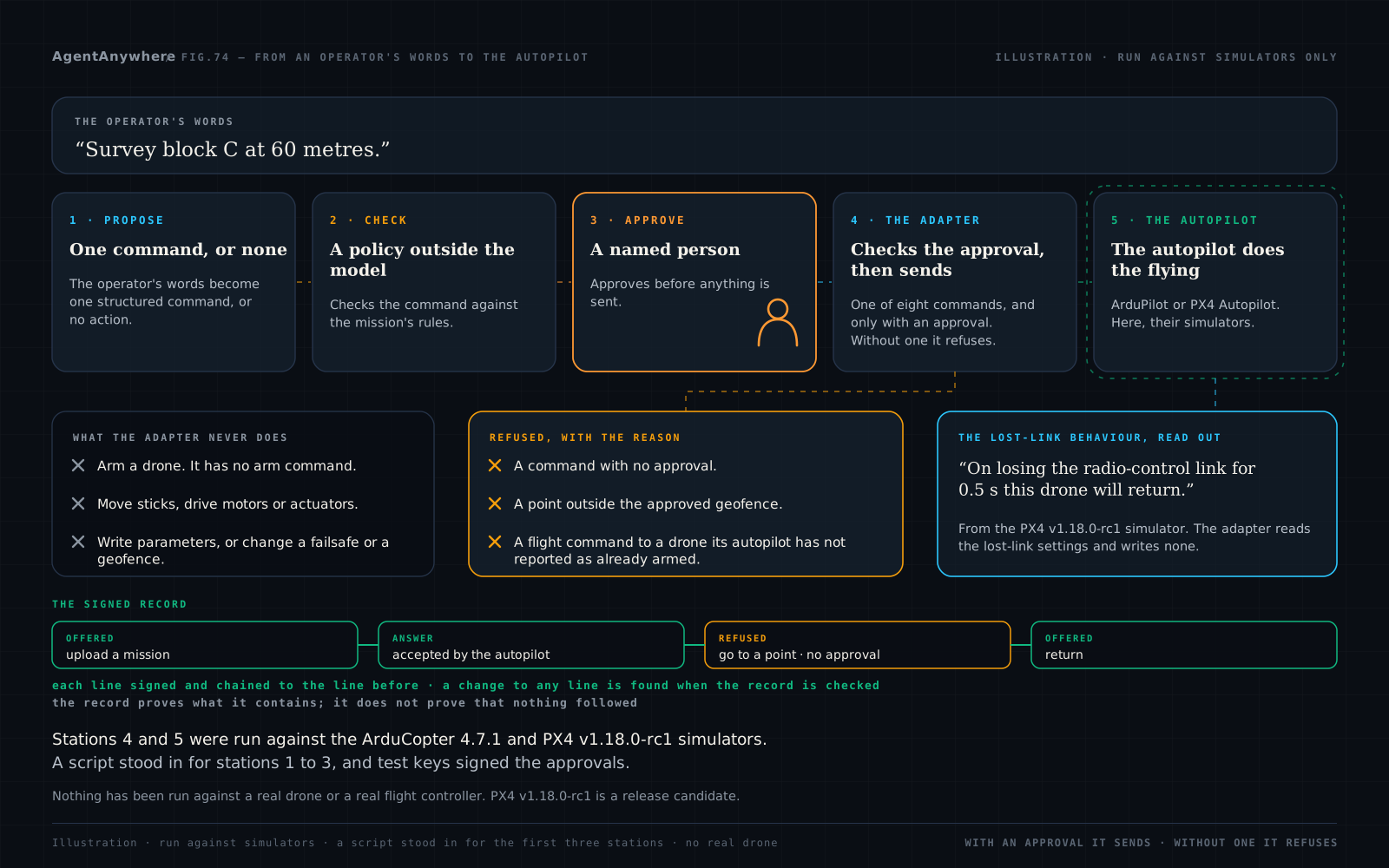
On our drone pages an operator's plain words become one exact command or none, a policy outside the model checks it, and a named person approves before anything is sent. One step is left: something has to carry the approved command to the drone's autopilot.
That is the adapter. It is a separate program that talks to the autopilot over its published wire protocol, through one neutral interface: state in, lost-link settings read, commands out. ArduPilot and PX4 Autopilot are reached over MAVLink 5; INAV 3 and Betaflight 4 over MSP, the MultiWii Serial Protocol.
The chain has not been run as a whole. In the simulator runs a script stood in for the software that would call the adapter, and the approvals were signed with test keys.
The adapter was run against simulators. The whole chain, from a sentence to an autopilot, has not been.
What an operator would get
Five things, each stated as what the adapter does.
A command goes out only with an approval
The adapter sends a command only if it carries an approval with two valid signatures: one made with the policy check's key and one made with the key of a named person. Without one it refuses. In every test and run the signatures were made with test keys by the test itself; the policy check that would sign is not part of the adapter, and no real key exists.
What an approval for a command pins down
An approval for a command names one drone, that one command with its exact numbers, and a time window, and it is used up by the command it approves. It can carry limits: a height band, a top speed, a geofence. The adapter refuses a command whose own numbers fall outside them.
A refusal that says why
A refusal names its reason, reaches the calling program and is written to the record, and nothing is sent to the drone. A refusal for the adapter's own reasons, for example that the drone is not armed, does not use up the approval.
The lost-link behaviour, read out
The adapter reads what the drone is set to do if it loses the ground-station link, the radio-control link or its position, and says it in a plain sentence beside the raw settings. It writes nothing. A setting the firmware does not report is said to be not reported; it is never shown as zero.
A signed record
The adapter writes a record of every command offered to it, every refusal and every answer from the autopilot. Each line is chained to the line before it and signed; a change to any line is found when the record is checked. The record proves what it contains. It does not prove that nothing followed, and whoever holds the drone's key could write lines of their own. In every test and run the key was a test key.
What the read-out sounds like
These are sentences the adapter printed, unedited.
From the PX4 v1.18.0-rc1 simulator on its default settings: “On losing the ground-station link this drone will take no action and carry on with what it was doing: that failsafe is switched off.” And from the same run: “On losing the radio-control link for 0.5 s this drone will return. PX4 first holds for its configured reaction delay, then acts.”
From the INAV 9.1.0 simulator: “On losing the radio-control link for 0.5 s this drone will land.” On INAV and Betaflight the only link whose loss changes the drone's behaviour is the radio-control link. Neither has a failsafe on a telemetry link, and the adapter says so.
The adapter also has a read-only mode, in which it refuses every command and every approval, whatever it carries, and still reads state and lost-link settings. Run once in that mode against the PX4 v1.18.0-rc1 simulator, it identified the autopilot, printed its state and its three lost-link sentences, and refused a “hold”.
What the adapter never does, and when it holds back
Both columns say what the adapter sends, as it is built today. What an autopilot then does was read from source and seen in simulators, at the versions named here only.
It never
Arms a drone. It has no arm or disarm command and cannot build one. Arming stays with the operator and the operator's own ground station. With one exception, in every simulator run in which a simulated drone was armed, something other than the adapter armed it. The exception is the first PX4 run described below, in which the adapter's own “start the mission” command made the simulated autopilot arm itself; that command is no longer sent to PX4.
Moves sticks, drives motors or actuators, or sends radio-control values, on any stack.
Writes parameters. It reads the lost-link settings and writes none.
Changes or switches off a failsafe or a geofence.
Carries a weapon, payload-release, targeting or engagement function. It has none, and none is planned.
It sends only when
The autopilot says the drone is already armed. A flight command is sent only to a drone that its autopilot reports as already armed, within the last two seconds.
No failsafe is in progress. No flight command is sent while the autopilot is acting on a failsafe.
The drone is inside its own geofence, or has none switched on, as reported within the last five seconds.
The drone is in the air, for every flight command except “start the mission”. On a drone on the ground, “start the mission” needs an approval in which the approver was told it will take off.
What the simulators and the source showed us
These were our own mistakes and assumptions, found before any hardware was involved.
In our first run against the PX4 simulator, on 10 October 2026, our “start the mission” command made the simulated drone arm itself, take off and climb to about 12 metres. Our design note had said that could not happen.
Nothing real was involved. But the adapter is never to cause arming, so the same day we changed it: every flight command is now sent only to a drone its autopilot reports as already armed, and “start the mission” on PX4 was rebuilt in a way that cannot arm.
That finding made us stop trusting message names. We read each project's source, at the versions we simulate, for what every message we send can do beyond its name.
Reading ArduPilot's source, we found that under some operator settings one of the adapter's own routine messages could have affected how the autopilot judges whether its ground station is still there. On ArduPilot's default settings it would not have. The adapter no longer sends that message to ArduPilot. A run against the ArduCopter 4.7.1 simulator then showed that the adapter still does its work without it; no run tested the failsafe itself.
In the same reading we found something about how ArduPilot handles a geofence around a change of flight mode that our design had not taken into account. The adapter now sends no flight command unless the autopilot has reported within the last five seconds that the drone is inside its geofence, or that none is switched on.
The same reading is why “change speed” is not offered on fixed-wing ArduPilot, why mission upload on INAV is off unless asked for, and why no flight command is sent while an autopilot is acting on a failsafe.
Four limits on that account
Only the first finding was caught by a simulator run. The other two were found by reading source.
The second finding needed a particular setting. It could only have mattered under an operator setting that is not the default.
The third finding changes what the adapter sends, not what the autopilot does. The autopilot behaves as before; the adapter holds back when the drone is outside its geofence or its geofence state has not been heard.
The projects behaved as their own source says. Nothing here is a fault in ArduPilot or PX4. What each message can do beyond its name was read from source by us; it is our reading, not the projects' statement.
What was run, stack by stack
One row per simulator. A run on one simulated drone at one version shows that case and no other.
| The software | The simulator and version | What the adapter offers | How far the run went |
|---|---|---|---|
| The software: ArduPilot on a multirotor (ArduCopter) 1 | ArduCopter 4.7.1 simulator | All eight commands. | On 10 October 2026, all eight commands were accepted by the autopilot, from take-off to landing, on one simulated multirotor. One run. The simulated drone was armed by ArduPilot's own ground-station program standing in for the operator, not by the adapter. |
| The software: ArduPilot on a fixed-wing drone (ArduPlane) 1 | ArduPlane 4.7.1 simulator | Six commands. “Land” and “change speed” are not offered. | Identification, state and lost-link settings read, and a mission upload, on a disarmed simulated drone only. No command was run on an armed simulated fixed-wing drone. |
| The software: PX4 Autopilot on a multirotor 2 | PX4 v1.18.0-rc1 simulator, a release candidate | All eight commands. | On 10 October 2026, all eight commands were accepted by the autopilot, from take-off through a change of speed, a move to a point, a change of height, a hold and a return, to a landing, on one simulated multirotor. One run. The simulated drone was armed by the simulator's own console, not by the adapter. |
| The software: INAV 3 | INAV 9.1.0 simulator, with no flight model: it answers the protocol, has no position and does not move | No commands by default. A mission upload exists and is switched on only when asked for by name; it is refused if the drone is armed. | Identification, state and failsafe settings read; and a mission upload, asked for by name, accepted after every waypoint was read back and compared. |
| The software: Betaflight 4 | Betaflight 2026.6.2 simulator, with no flight model | No commands at all, by design. The adapter reads state and settings only. | Identification, state and failsafe settings read. No command exists to run. |
ArduPilot, PX4 Autopilot, INAV, Betaflight and MAVLink are independent projects. ShepHertz is not affiliated with, sponsored by or endorsed by any of them. Their names appear here only to say which software the adapter was tested against, in simulation.
One run, end to end, with three refusals
One run against the PX4 v1.18.0-rc1 simulator went through the adapter's service from end to end. A patrol of three waypoints was uploaded and started; a move to a point, a hold and a return were carried out. Three things were refused on the way: a command with no approval, a point outside the approved geofence, and a request with no equivalent among the eight commands.
What has not been done
No real drone. No real flight controller, no radio, no propellers. No board of any kind has been connected to the adapter.
Few runs, five versions. Most cases are one run; none is more than a few. The versions are the five in the table and no others. Any other version needs its behaviour re-read and re-run before a command is sent to it.
Two vehicle classes, unevenly. Multirotor on ArduPilot and PX4, with commands. Fixed-wing on ArduPilot, disarmed only. Fixed-wing on PX4, not run. No other class. On the INAV and Betaflight simulators nothing armed and nothing was in the air.
Not run: loss of a link in flight, a failsafe firing, a lossy link, a real serial port. A serial link is built and was rehearsed only against a simulator, through a stand-in for the cable.
Not built: reconnection after the link to the drone drops (the adapter then refuses everything and does not reconnect), flow control on a serial line, real keys, and protected storage for keys on the drone. The policy check that would sign an approval is not part of the adapter. The software that would call the adapter was not run with it; a script stood in for it.
Known and open, Betaflight. While the Betaflight adapter is reading, a Betaflight drone that has lost its radio-control signal does not sound its lost-signal beeper. For that reason the Betaflight adapter is for a bench only.
Known and open, PX4. A “go to a point” outside the autopilot's own geofence is acknowledged by the autopilot and then dropped; the adapter reports “accepted”.
No figures, no certificate, no public code. No speed or reliability figure has been measured on the hardware the adapter would run on. No certification has been sought. The adapter is not open source.
Work on a customer's own drone is done with that customer.
Frequently asked questions
Has the adapter been run on a real drone?
No. Nothing has been run against a real drone or a real flight controller. Every run was against a simulator, on one computer, with no radio.
Which autopilot simulators was it tested against?
The ArduPilot ArduCopter 4.7.1 and ArduPlane 4.7.1 simulators, the PX4 Autopilot v1.18.0-rc1 simulator (a release candidate), the INAV 9.1.0 simulator and the Betaflight 2026.6.2 simulator, and no other versions. ArduCopter and PX4 on a multirotor get all eight commands. INAV gets no commands by default, with a mission upload that is off unless asked for by name. Betaflight is read only.
Which commands can the adapter send to an autopilot?
Eight and no others: upload a mission, start the mission, hold, change height, change speed, go to a point, return, land. A mission is at most 64 items, each one of take off, waypoint, hold for a time, return or land.
Does the adapter arm the drone?
The adapter has no arm or disarm command and cannot build one. Arming stays with the operator and the operator's own ground station. In our first run against the PX4 simulator, one of its commands made the simulated autopilot arm itself; that command is no longer sent to PX4. That is a statement about what the adapter sends; what an autopilot then does was read from source and seen in simulators at the versions named in this post only.
Who approves a command before it reaches the autopilot?
The adapter sends a command only if it carries an approval with two valid signatures: one made with the policy check's key and one made with the key of a named person. Without one it refuses. In every test and run so far the signatures were made with test keys; the policy check that would sign is not part of the adapter, and no real key exists.
What does the adapter tell an operator about lost-link behaviour?
It reads what the drone is set to do if it loses the ground-station link, the radio-control link or its position, and says it in a plain sentence beside the raw settings, for example “On losing the radio-control link for 0.5 s this drone will return”, from the PX4 v1.18.0-rc1 simulator. It writes nothing.
Is ShepHertz affiliated with ArduPilot, PX4 Autopilot, INAV or Betaflight?
No. They are independent projects, and ShepHertz is not affiliated with, sponsored by or endorsed by any of them. Their names appear here only to say which software the adapter was tested against, in simulation.
Sources
The projects whose simulators the adapter was tested against, at their own addresses.
Written by
AgentAnywhere Research
The team that builds the platform and the models
AgentAnywhere Research writes about the platform, the model families and the trust layer we build and run in India. Where a figure is ours, it says what it covers; where something is a demonstration, it says so.